
Medium · Automation, Web Scraping · Draft
When the API Is Not Enough: Browser-Assisted Data Extraction on Behalf of the User
Modern SaaS platforms often expose public APIs. In theory, this should make integrations, reporting, compliance evidence collection, analytics, and automation straightforward.
First published on Medium on 26 May 2026. Read it on Medium. 8 min read.
In practice, the available API is not always sufficient:
- Sometimes the public API does not exist.
- Sometimes it exists, but exposes only a limited subset of the data.
- Sometimes the data is visible in the web application but is not available through documented endpoints.
- And sometimes the export functionality is limited to a CSV file that does not include the metadata, relationships, comments, history, or audit trail required for a legitimate business purpose.
This creates a practical problem: the user is authorized to access the information, the information is visible in the application, but there is no adequate official mechanism to retrieve it in a structured and repeatable way.
In such cases, browser-assisted data extraction may become a practical workaround.

1. Not a Robotic Process Automation (RPA)
This approach may look similar to Robotic Process Automation (RPA), but it is not quite the same thing.
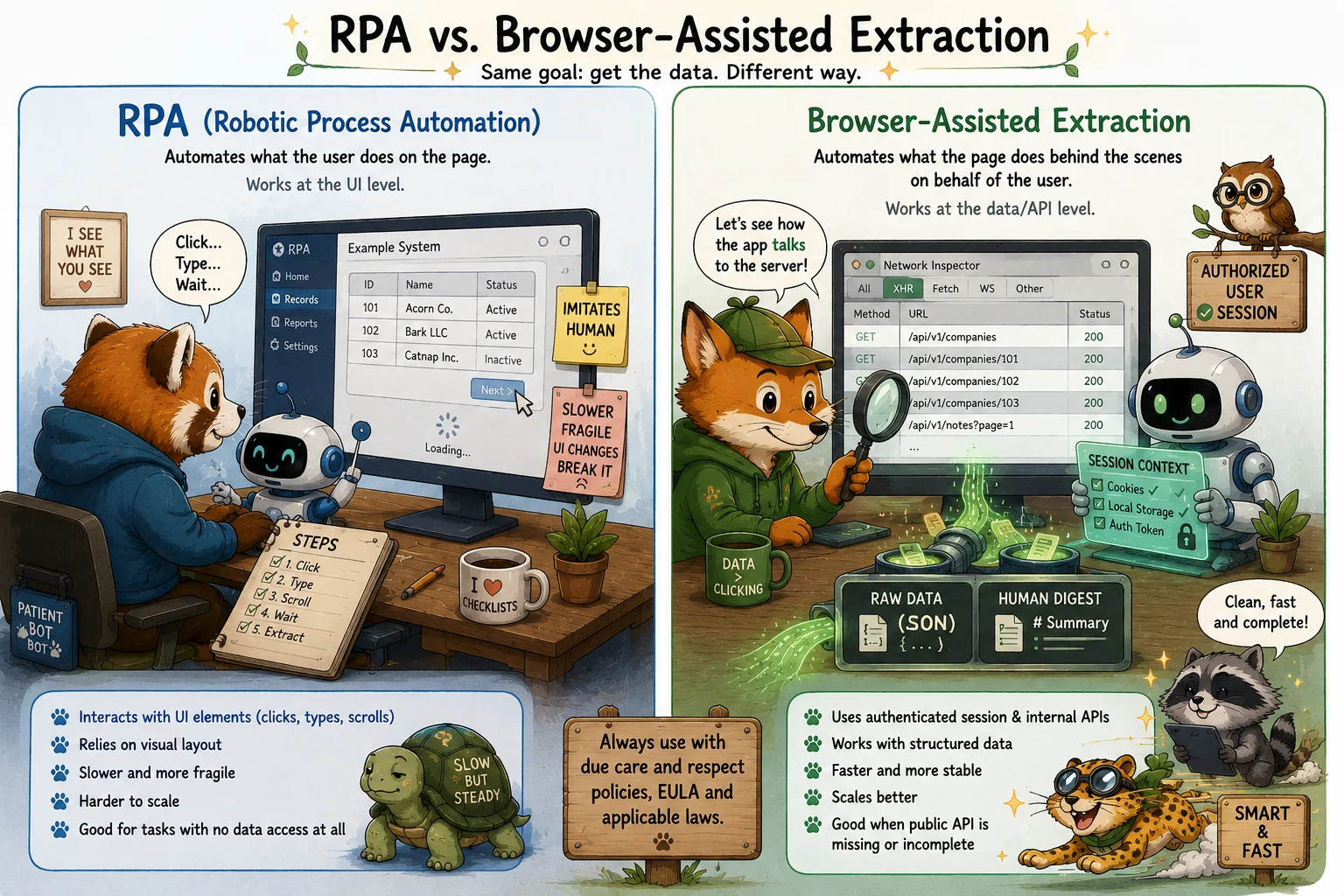
Traditional RPA usually imitates the user interface: it clicks buttons, fills forms, scrolls pages, waits for screens to load, and reads visible elements. It treats the web application as a visual workspace and automates the same steps a human would perform manually.
Browser-assisted extraction works at a different layer. The browser is still used for legitimate user authentication and access control, but the actual data collection is performed by observing and reusing the application’s own communication with its backend. Instead of copying values from the screen, the automation retrieves structured data that the application itself already receives in order to render the screen.
In simple terms:
- RPA automates what the user does on the page.
- Browser-assisted extraction automates what the page does behind the scenes on behalf of the user.
This distinction matters. Browser-assisted extraction is usually more stable, faster, and more complete than visual UI automation, because it can work with structured payloads rather than rendered interface elements. At the same time, it requires greater care, because it may rely on internal application behavior, undocumented endpoints, cookies, session storage, local storage, or other session-related artifacts.
Therefore, this pattern should be treated as a controlled workaround. It is not a replacement for an official API, a supported integration, or a properly documented export function. It is closer to “API discovery through the authenticated browser session” than to classical RPA.
The principle remains the same: the automation must act only on behalf of an authorized user, collect only data the user is allowed to access, and be used with legal, contractual, privacy, and security considerations in mind.
2. The Scenario
Assume there is a system used by a company for governance, compliance, operations, or internal administration.
The system has a web interface. Authorized users can log in, navigate through records, view details, and manually export or copy information. However, the system has one of the following limitations:
- No public API is available.
- The public API is incomplete and does not expose all required data.
- The export functionality is insufficient for business, audit, migration, or reporting needs.
- Important metadata is visible in the browser but not available through documented integration methods.
- Manual extraction would be slow, error-prone, and difficult to reproduce.
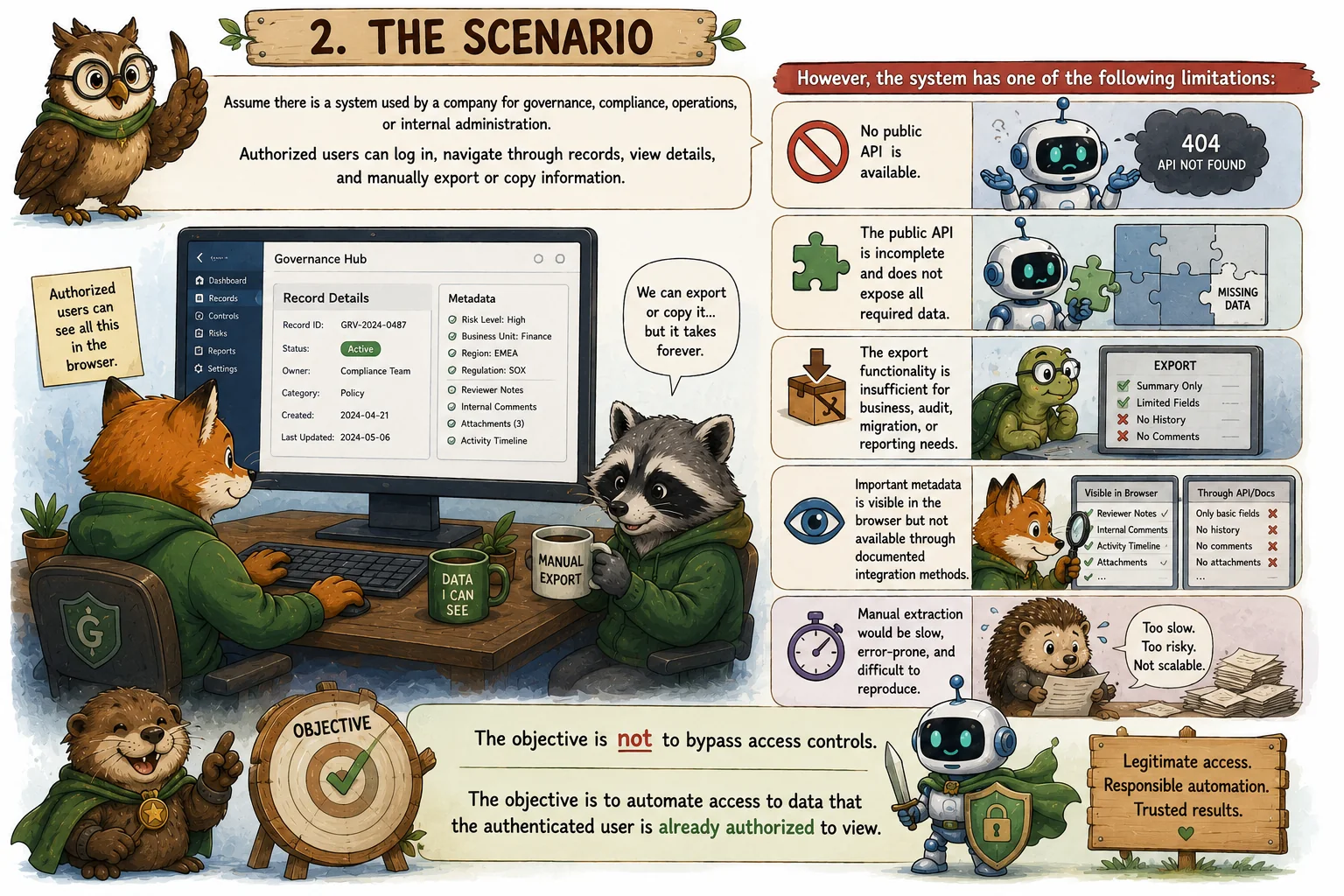
The objective is not to bypass access controls. The objective is to automate access to data that the authenticated user is already authorized to view.
3. The General Approach
The general pattern is browser-assisted scraping on behalf of the user.
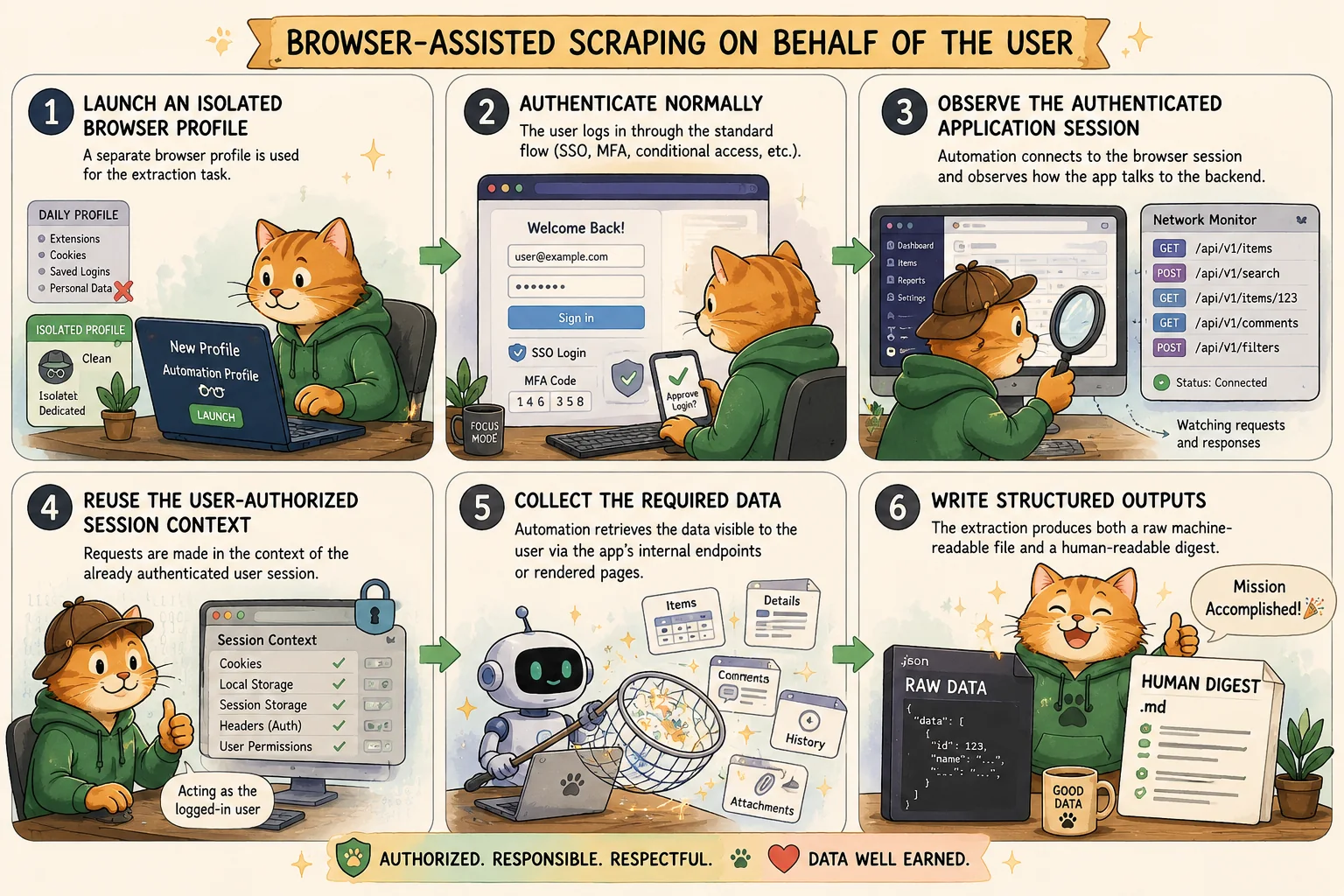
A typical workflow may look as follows:
- Launch an isolated browser profile. A separate browser profile is used for the extraction task. This avoids mixing the automation session with the user’s daily browsing profile, extensions, saved credentials, unrelated cookies, and personal sessions.
- Authenticate normally. The user logs in through the standard web interface, using the normal authentication flow, including SSO, MFA, conditional access, or any other controls required by the system.
- Observe the authenticated application session. After authentication, the automation connects to the browser session and observes how the web application communicates with its backend.
- Reuse the user-authorized session context. The automation performs requests in the context of the already authenticated user session. In some systems, relevant session material may be stored in browser-accessible storage mechanisms, such as cookies, session storage, or local storage.
- Collect the required data. The automation retrieves the data visible to the user through the application’s internal endpoints or rendered pages.
- Write structured outputs. The extraction produces both a raw machine-readable file and a human-readable digest (recommended).
4. Why This Works
Many web applications are built as browser-based clients communicating with backend services. Even when there is no public API, the browser itself often uses internal APIs to load the data shown in the user interface.
This means that the easiest way to understand how to retrieve all relevant information from a system is sometimes to inspect how the system itself retrieves that information for the browser.
That is the uncomfortable practical reality.
From a technical perspective, the web application already knows where the data is, which endpoints are used, what parameters are required, and how records are paginated or filtered. Browser-assisted extraction simply automates what the user could otherwise do manually, provided it remains within the user’s legitimate access rights.
5. The “Hack” That Is Not Really a Hack
There is a common joke among engineers and compliance automation practitioners:
The easiest way to get all the information from a system is to “hack” it.
In this context, “hack” should not mean unauthorized access, exploitation, privilege escalation, or circumvention of security controls. It means understanding how the web application works internally and using that knowledge to automate an otherwise manual process.
For example, some web applications store temporary session artifacts in the browser so the frontend can communicate with backend services. In some cases, automation can reuse the authenticated browser session to perform data extraction on behalf of the user.
This can be a powerful technique when an official API is unavailable or incomplete. It is also a technique that must be handled carefully, because session material is sensitive and may provide access equivalent to the logged-in user.
6. Legal and Contractual Notice
This type of automation must be used with due care.
Even when the user is legitimately authorized to access the data, browser-assisted scraping may violate the system’s End User License Agreement (EULA), Terms of Service, Acceptable Use Policy, contractual restrictions, or security policy.

Before using such an approach, the organization should consider:
- Contractual permission: whether scraping, automation, reverse engineering, or use of internal endpoints is restricted.
- Data ownership: whether the organization has the right to extract and process the target data.
- Access authorization: whether the user account used for extraction is authorized to view all collected information.
- Rate limits and system impact: whether automation may overload the service or trigger abuse detection.
- Security obligations: whether session tokens, cookies, or similar artifacts are handled securely.
- Auditability: whether the extraction process can be explained, logged, and justified.
- Retention requirements: whether the extracted data is stored only for as long as needed.
- Privacy requirements: whether personal data is minimized and protected.
This pattern should not be used casually. It is a workaround, not a substitute for a properly supported integration.
7. Security Considerations
Session artifacts, including cookies and tokens, must be treated as sensitive credentials.
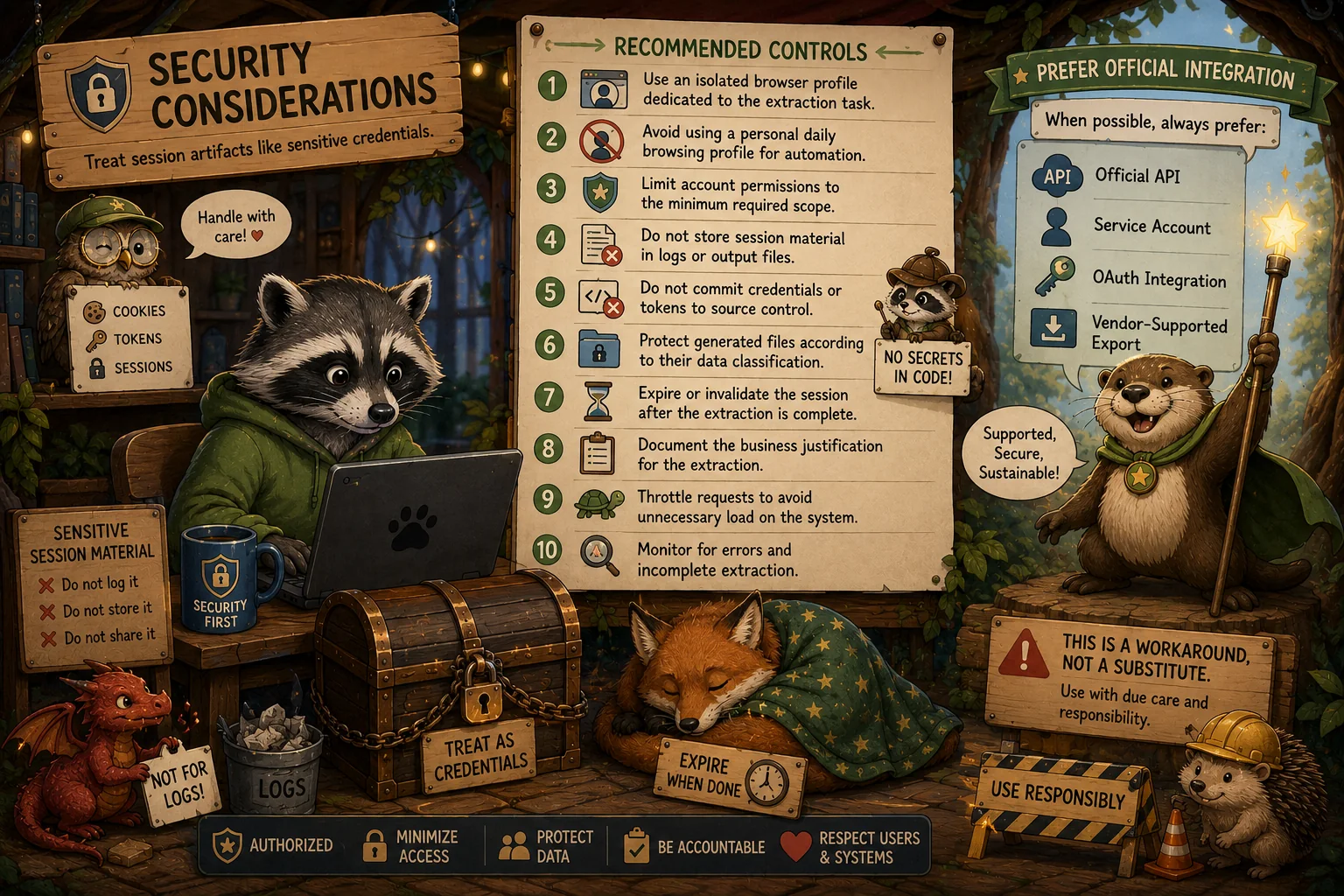
If automation relies on an authenticated session, the following controls are strongly recommended:
- Use an isolated browser profile dedicated to the extraction task.
- Avoid using a personal daily browsing profile for automation.
- Limit the account permissions to the minimum required scope.
- Do not store session material in logs or output files.
- Do not commit credentials or tokens to source control.
- Protect generated files according to their data classification.
- Expire or invalidate the session after the extraction is complete.
- Document the business justification for the extraction.
- Throttle requests to avoid unnecessary load on the system.
- Monitor for errors and incomplete extraction.
Where possible, an official API, service account, OAuth integration, or vendor-supported export mechanism should always be preferred.
8. Example Theoretical Use Case
Assume a company needs to extract records from an internal SaaS platform for compliance review.
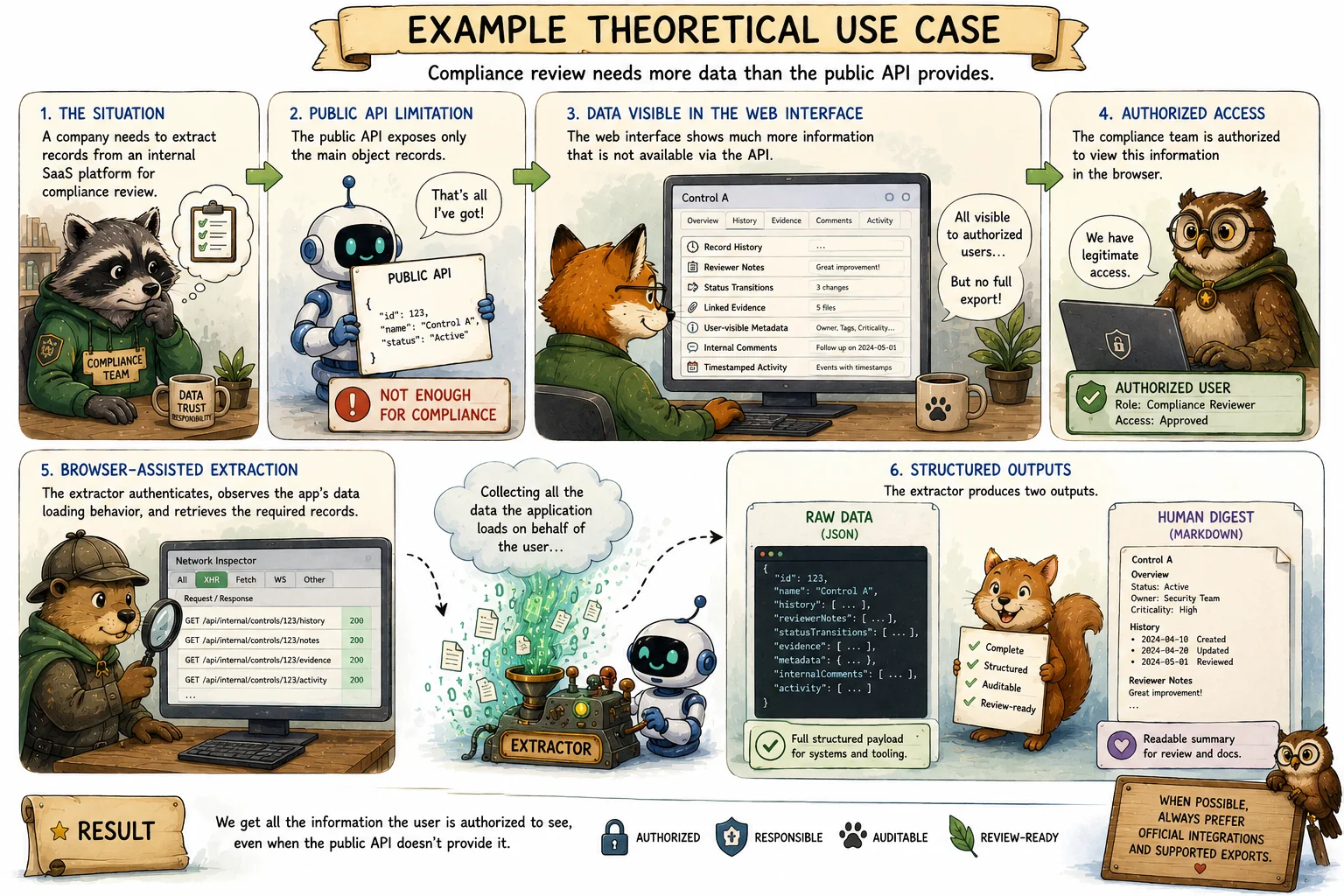
The public API exposes only the main object records, but the web interface displays additional information, such as:
- Record history
- Reviewer notes
- Status transitions
- Linked evidence
- User-visible metadata
- Internal comments
- Timestamped activity
The compliance team is authorized to view this information in the browser, but there is no complete export function.
A browser-assisted extractor can authenticate as the authorized user, observe the application’s own data loading behavior, retrieve the required records, and produce two outputs. The JSON file preserves the full structured payload. The Markdown file provides a readable version suitable for review and documentation.
9. Responsible Use
Browser-assisted scraping can be legitimate when it is used to retrieve data that the user is already authorized to access and when no adequate official export mechanism exists.
However, it should be treated as an exception-based engineering solution. It should be reviewed from legal, security, privacy, and operational perspectives before use.
The best outcome is still a vendor-supported API. But when the API is missing or insufficient, carefully controlled browser-assisted extraction may provide a practical bridge between manual work and proper integration.
10. Conclusion
Systems without sufficient APIs create friction for compliance, audit, reporting, migration, and operational automation. In such cases, browser-assisted data extraction may be a pragmatic workaround.
The key principle is simple: automate only what the user is legitimately allowed to access, protect session material as credentials, avoid unnecessary data collection, respect contractual restrictions, and document the justification.
Used responsibly, this approach can turn an otherwise manual and unreliable process into a repeatable, structured, and auditable workflow.

This page is a full copy of the story as published on Medium. Read it on Medium. Illustrations generated with AI.